Starting an Amazon FBA business involves more than finding a product and sending it to Amazon. You also need to manage inventory, monitor prices, coordinate with suppliers, and track sales. As orders increase, handling these tasks manually can take up valuable time and lead to avoidable mistakes.
Automation helps keep these operations organized without requiring you to check everything yourself. For beginners, the goal isn't to automate the entire business at once. It's to start with the tasks that have the biggest impact on daily operations.
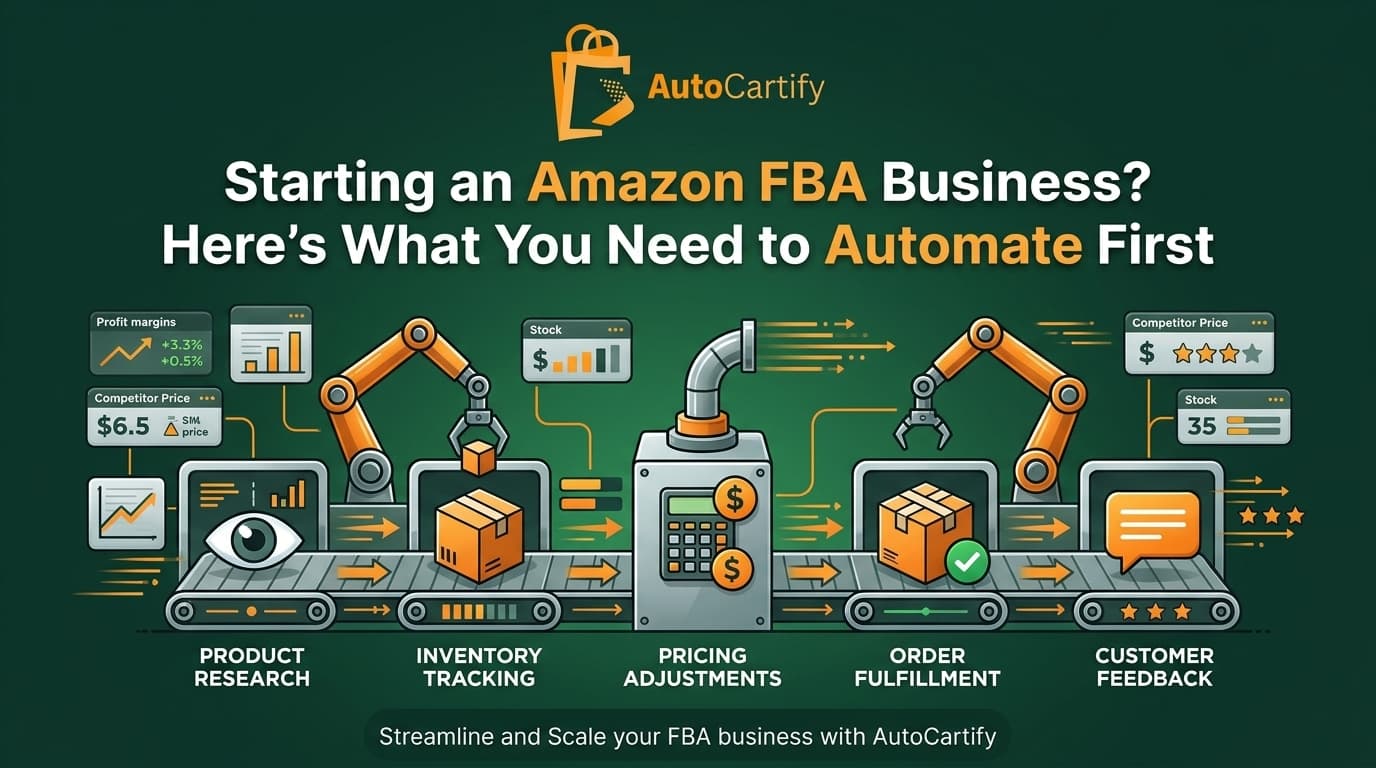
1. Product Research and Market Analysis
Choosing the right product is one of the most important decisions when starting an Amazon FBA business. A product might look profitable, but high competition, weak demand, or expensive sourcing can make it a poor investment.
Product research tools help sellers compare demand, competition, selling prices, and estimated profit margins. They can also track competitor listings and changes in market trends.
For example, a kitchen accessory might have strong sales, but several established sellers could already be offering similar products at lower prices. Identifying this competition before investing can help you avoid a difficult market.
Automation makes product research more efficient, but every opportunity still needs to be reviewed before placing an order.
2. Inventory Tracking and Stock Management
Poor inventory management can lead to two expensive problems: running out of popular products or holding more stock than you can sell.
Tracking a few products manually may work initially, but it becomes harder as your catalog grows. Automated inventory management helps monitor stock levels, identify low-stock products, and plan reorders.
Consider a product that sells 15 units daily while your supplier needs two weeks to prepare another shipment. Without proper stock monitoring, you could run out before the next delivery arrives.
Low-stock alerts and inventory forecasting help you plan ahead and maintain more consistent product availability.
3. Order Processing and Fulfillment Monitoring
Amazon FBA handles product storage, packing, shipping, and many delivery-related customer service responsibilities. This removes much of the work involved in processing individual orders.
However, sellers still need to monitor fulfillment performance, returns, stranded inventory, and account notifications.
Automated order monitoring helps highlight issues that require attention. Instead of repeatedly checking order activity, you can receive updates when something needs to be reviewed.
This allows you to focus on managing your store while Amazon handles the physical fulfillment process.
4. Pricing and Profit Monitoring
More sales don't necessarily mean more profit. Amazon sellers must account for product costs, referral fees, fulfillment charges, storage fees, shipping, and advertising expenses.
Pricing automation can monitor competitor prices and adjust listings according to predefined rules. This is particularly useful in competitive categories where prices change frequently.
However, lowering prices to match every competitor can reduce your margins. Set minimum selling prices and review your expenses before relying on automated repricing.
Regular profit tracking also helps identify products that generate revenue but leave little money after expenses.
5. Customer Messages and Feedback Monitoring
Although Amazon handles many customer service responsibilities for FBA orders, sellers still need to monitor buyer messages, product reviews, and account feedback.
Customer comments can reveal problems that need attention. For example, repeated complaints about damaged packaging may indicate an issue with your supplier or product preparation.
Automated notifications help you identify new messages, negative feedback, and changes in product reviews. You can then investigate concerns and take appropriate action.
Make sure all customer communication follows Amazon's seller policies.
6. Sales Reporting and Performance Tracking
Understanding your store's performance is essential when deciding what to improve.
Sales reports help you review revenue, advertising expenses, conversion rates, product performance, and inventory movement.
For example, a product might generate regular orders while its profit margin declines because advertising costs have increased. Without reviewing performance data, this problem can easily go unnoticed.
Automated reporting brings important figures together, making it easier to identify changes and evaluate which products are performing well.
Even a weekly performance review can help new sellers make better decisions about pricing, advertising, and inventory.
What Should You Automate First as a New Amazon FBA Seller?
You don't need complicated software or expensive tools when starting out. Focus on the tasks that consume the most time or create the biggest operational problems.
A practical starting order is:
Product research: Evaluate demand, competition, and profit potential before investing.
Inventory tracking: Monitor stock levels and plan reorders.
Order monitoring: Keep track of fulfillment updates and potential issues.
Pricing and profit tracking: Review expenses and protect profit margins.
Customer monitoring: Stay informed about messages and product feedback.
Sales reporting: Evaluate performance and identify areas for improvement.
Start with product research and inventory management. Introduce additional automation as your store grows and your daily responsibilities increase.
How AutoCartify Helps Manage Amazon FBA Operations
Managing product research, inventory, suppliers, and store activities can become challenging as your Amazon business grows.
AutoCartify provides Amazon FBA automation services covering product research, store management, inventory coordination, and day-to-day operations. This support can help sellers manage routine responsibilities and spend more time on business planning and growth.
If you need help managing your store, explore AutoCartify's Amazon FBA automation services to see how its services can support your business.
Final Thoughts: Build Your Amazon FBA Business on the Right Systems
Running an Amazon FBA business requires consistent attention to products, inventory, pricing, and performance. Automating these responsibilities can reduce manual work and make daily management easier.
Start with product research and inventory tracking, then introduce additional systems as your store grows. Automation should support your decisions, not replace them.
With the right processes in place, you can spend less time managing repetitive tasks and more time building a sustainable Amazon FBA business.