Running a Shopify store involves more than adding products and receiving orders. Store owners also need to process purchases, manage inventory, coordinate shipping, update product details, and respond to customer inquiries. These tasks become harder to manage as order volumes increase.
For example, processing 20 orders a day may be manageable manually. Handling 200 orders requires more time and coordination, increasing the chances of missed updates and inventory errors.
Shopify automation helps businesses manage these operations through applications, integrations, and automated workflows. Instead of repeating routine tasks, store owners can establish processes that run automatically and keep daily operations organized.
What Is Shopify Automation?
Shopify automation uses applications and predefined workflows to handle repetitive store activities with minimal manual involvement.
For example, when a customer places an order, Shopify can send a confirmation email and update inventory automatically. Once the order ships, an integrated system can share tracking information with the customer.
Other common applications include abandoned cart reminders, low-stock notifications, product updates, and customer follow-ups.
The goal is to reduce manual work while keeping essential store operations running smoothly.
How Does Shopify Automation Work?
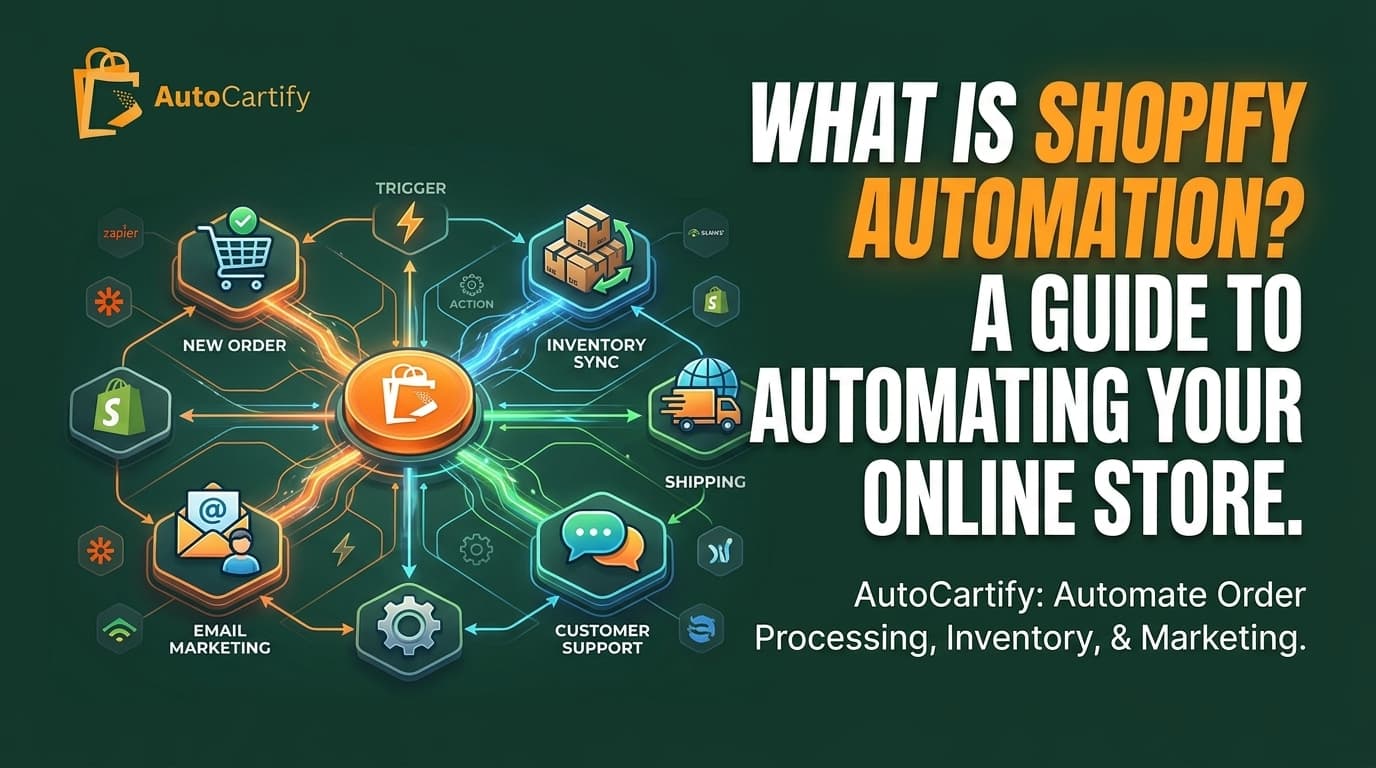
Shopify automation works through triggers, conditions, and actions.
A trigger starts a workflow when an event occurs, such as a new order or an inventory change. Conditions determine whether specific requirements are met, while actions define what happens next.
For example, when a customer purchases a product:
Shopify detects the new order.
Payment status is checked.
Inventory quantities are updated.
An order confirmation email is sent.
Order details are forwarded to the fulfillment system.
These steps can happen automatically once the workflow is configured. Shopify Flow and third-party integrations help connect applications and manage these processes.
Which Shopify Store Tasks Can You Automate?
Several routine store activities can benefit from automation, particularly when a business manages multiple products or receives regular orders.
Order Processing and Fulfillment
Automation can handle order confirmations, transfer purchase details to fulfillment systems, and update order statuses. For example, a store receiving dozens of orders daily can automatically forward purchase information to its fulfillment partner instead of processing each order manually.
Inventory and Stock Management
Inventory automation updates stock quantities as products sell and can notify store owners when items reach a specific stock level. Businesses selling through multiple channels can also synchronize inventory to reduce overselling.
Product Management
Managing a large catalog requires regular updates to prices, descriptions, and product availability. Automation tools can simplify scheduled changes and synchronize product information across connected sales channels.
Email Marketing and Customer Notifications
Email marketing applications can send abandoned cart reminders, welcome emails, order updates, and post-purchase follow-ups. For example, customers who leave products in their carts can receive automated reminders encouraging them to complete their purchases.
Shipping and Tracking Updates
Shipping integrations can update fulfillment statuses, share tracking information, and support shipping label creation. Customers receive delivery updates without employees having to send each notification manually.
Customer Support
Chatbots and automated responses can handle common questions about order status, shipping times, and return policies. Complicated complaints and payment issues should still be handled by a support representative.
How Do You Automate Your Shopify Store?
Setting up automation doesn't require changing every store operation at once. Start with activities that consume the most time and follow predictable steps.
Identify repetitive tasks: Review daily operations and identify activities that require frequent manual work.
Choose suitable applications: Select tools based on your requirements, such as inventory management, email marketing, or order processing.
Connect integrations: Link Shopify with the necessary applications, fulfillment providers, and business systems.
Create workflows: Define the triggers, conditions, and actions for each automated process.
Test workflows: Place test orders and check inventory updates, notifications, and fulfillment information.
Monitor performance: Review automated processes regularly and fix issues as your store grows.
Testing is particularly important because incorrect workflows can create duplicate notifications, inaccurate stock information, or missed updates.
What Are the Best Shopify Automation Tools?
Several applications support different Shopify automation requirements.
Shopify Flow: Automates store activities using triggers, conditions, and actions.
Klaviyo: Manages email and SMS marketing, including abandoned cart campaigns and customer follow-ups.
Zapier: Connects Shopify with third-party applications to automate information sharing.
Mechanic: Supports customizable automation for orders, products, customers, and scheduled tasks.
Inventory and fulfillment integrations: Help synchronize stock, manage orders, and coordinate warehouse operations.
The right combination depends on your store's size and requirements. Installing unnecessary applications can increase costs and make store management more complicated.
Benefits of Automating Your Shopify Store
Shopify automation can improve daily operations while reducing the time spent on repetitive activities.
Saves time: Automates routine tasks such as order updates and customer notifications.
Reduces errors: Minimizes mistakes caused by manual data entry and missed updates.
Improves order management: Helps orders move through processing and fulfillment.
Maintains inventory accuracy: Keeps stock information updated across connected channels.
Improves customer communication: Sends timely confirmations and shipping notifications.
Supports business growth: Makes it easier to manage increasing order volumes without adding the same amount of administrative work.
Automation still requires proper configuration and monitoring to ensure workflows operate correctly.
Should You Automate Your Shopify Store Yourself or Hire an Agency?
Small stores with limited products can often manage basic automation themselves using Shopify Flow and standard applications.
However, managing multiple sales channels, large inventories, and external fulfillment partners requires more coordination. For example, when a product sells on Shopify, its stock availability may also need updating on Amazon and Walmart.
A Shopify automation agency can help configure these integrations, create custom workflows, and manage complicated store operations.
AutoCartify provides Shopify automation support, including workflow setup, inventory management, order processing, product management, and third-party integrations. Professional assistance can be useful when existing systems aren't working together properly or manual tasks are taking too much time.
Get Professional Help With Shopify Store Automation
Managing a Shopify store becomes easier when inventory, orders, and fulfillment processes work together.
AutoCartify helps Shopify businesses streamline daily operations through automation services and integrations. Whether you need inventory management, order processing, product updates, or third-party application connections, the right setup can reduce manual work.
Explore AutoCartify's Shopify automation services to find support that matches your business requirements.
Frequently Asked Questions
What Is Shopify Automation Used For?
Shopify automation handles repetitive activities such as order processing, inventory updates, email marketing, shipping notifications, and customer communication.
Can I Automate My Entire Shopify Store?
Many store operations can be automated, but activities such as product strategy, pricing decisions, and complicated customer complaints still require human involvement.
Is Shopify Automation Suitable for Small Businesses?
Yes. Small businesses can save time by automating order confirmations, inventory updates, and customer emails, even with relatively low order volumes.
What Are the Best Apps for Shopify Automation?
Shopify Flow, Klaviyo, Zapier, and Mechanic are popular options. The best choice depends on which store activities you want to automate.
Does Shopify Automation Reduce Manual Work?
Yes. Automated workflows handle repetitive activities such as sending notifications, updating stock, and transferring order information, reducing the need for manual involvement.
How Much Does It Cost to Automate a Shopify Store?
Costs depend on the applications, integrations, and level of customization required. Basic workflows may be available through existing Shopify features, while advanced automation may require paid applications or professional setup services.